How to run a small team without heavy project management software
The short answer
A small team can work without heavy project management software by using one shared starting point, three task states, separate dated reminders, visible requests, and a short end-of-day note. The system should make current work obvious without requiring someone to maintain reports, fields, or dashboards.
In short
- Open the day from one shared workspace.
- Use only to do, doing, and done for active tasks.
- Keep deadlines and renewals as reminders, not ordinary tasks.
- Record blockers and tomorrow’s first action before finishing the day.
Most project management tools were designed for departments of fifty and then sold to teams of five. If setting one up costs you a weekend of configuration and your team still keeps its real work in chat threads, the tool is not the problem — the size of the tool is. Here is a lighter routine that works for small teams, and how to run it on Loveley Desk.
1. Give the day one starting point
The biggest cost in a small team is not missing features — it is the fifteen minutes each morning spent reconstructing what matters from email, chat and memory. Pick one screen everyone opens first and put today's work on it: reminders due today, open tasks, and anything the team pinned yesterday.
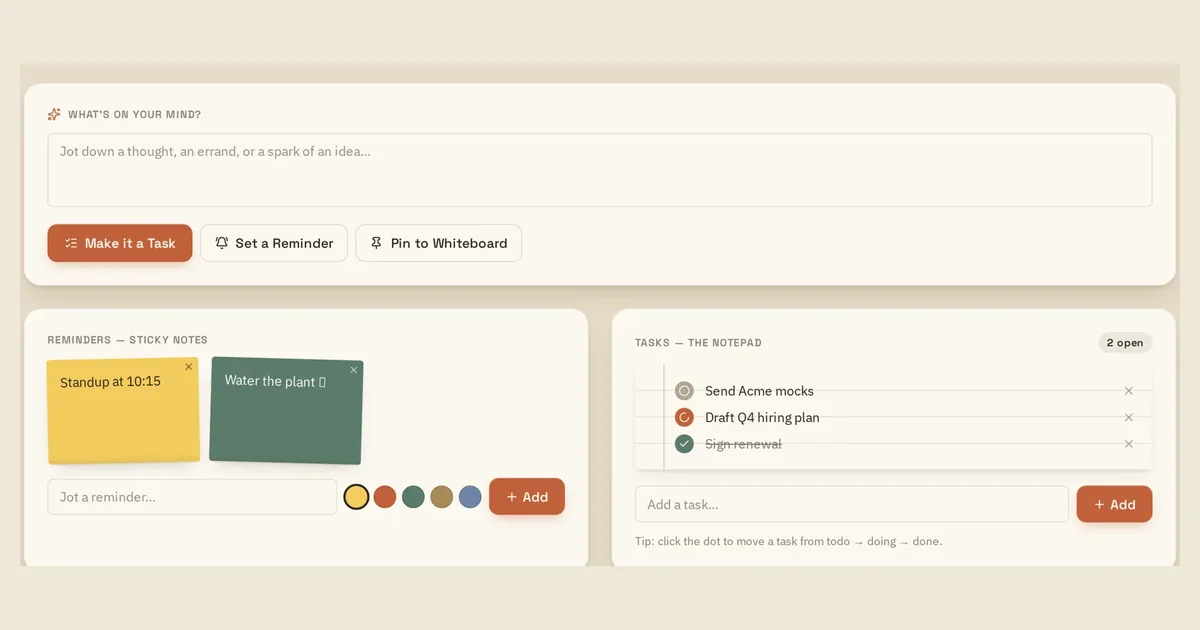
On Loveley Desk that screen is the desk itself: reminders sit as sticky notes, tasks sit on a notepad, and the corkboard holds whatever the team wanted everyone to see.
2. Keep exactly three task states
Small teams rarely need backlog grooming, story points or swimlanes. They need to know what has not started, what someone is holding right now, and what is finished. Three columns — to do, doing, done — is enough to spot a stalled item at a glance.
Add a fourth state only when a real handoff exists, for example 'waiting on client'. If nobody can name who is blocked, the column is decoration.
3. Separate reminders from tasks
A task is work someone will do. A reminder is a moment in time: renew the licence, call the supplier back, send the invoice on the first. Mixing them makes the task list feel permanently overloaded, because time-based items keep reappearing at the top.
Keep them in two visible places. Reminders live on sticky notes with a date; tasks live on the board with a status.
4. Write three lines at the end of the day
The cheapest project management ritual is a short daily note: what moved, what got stuck, what tomorrow starts with. It takes two minutes and removes the Monday-morning archaeology of trying to remember where a piece of work stopped.
A daily journal also gives you something to review before a client call or a monthly check-in without generating a report.
5. Make requests between people visible
In small teams, work usually moves through direct messages, which means it disappears the moment the chat scrolls. Give cross-person or cross-department requests a place with a status, so 'did you ever send that?' stops being a daily question.
A one-week starting setup
- Day 1: move only the work that is live this week onto the board — not the archive.
- Day 2: turn every date-based item into a reminder instead of a task.
- Day 3: agree one place for files so nobody attaches the same document twice.
- Day 4: start the three-line end-of-day note.
- Day 5: review the board together for ten minutes and delete what nobody will do.
Where Loveley Desk fits
Loveley Desk is a ready-made version of that routine: a desk with a task notepad, sticky reminders, a file cabinet, a shared corkboard and a daily journal — no databases or templates to build first. The Solo Desk is free, and you can open the demo desk without an account.
Example: a five-person team’s workday
This is an illustrative routine for a small studio, not a customer result.
- At 9:00, everyone opens the same desk and checks today’s reminders and open tasks.
- Each person moves one current item into doing; any blocked handoff becomes a visible request.
- Files and decisions are attached to the relevant project instead of left in chat.
- Before signing off, each person records what moved, what is stuck, and tomorrow’s first action.
Put the workflow into practice
Common questions
How many task statuses does a small team need?
Start with three: to do, doing, and done. Add another status only when it represents a real handoff, such as waiting for a client.
Can a small team work without a project manager?
Yes, when ownership, current status, deadlines, and blockers remain visible. One person should still own each task, even if the team shares responsibility for the outcome.
What should a small team review every week?
Review work that has not moved, overloaded work-in-progress, unresolved requests, and tasks nobody intends to complete. Keep the review short and remove stale work.
Sources and further reading
- Atlassian: Working with WIP limits for Kanban — Background on limiting work in progress to expose bottlenecks and protect focus.
- GitLab Handbook: Asynchronous communication — A documented approach to written context, ownership transfer, and asynchronous work.
Read next
- A small-team workflow that doesn't need a dashboard
- Task board vs to-do list: which one a small team actually needs
- Everything on the Loveley Desk — the full feature list.
- Pricing — what the free Solo Desk includes, and what a team adds.
- Loveley Desk vs Asana — a side-by-side comparison.
Try the desk
Tasks, sticky reminders, files, a corkboard and a daily journal in one calm place. Solo Desk is free, and the demo needs no account.